A design editor with the
whole library inside.
Social posts, slides, OG images, one-pagers: pick a canvas, drop in illustrations, icons and photos from the sidebar, set the type in any of 1,600+ Google Fonts, recolour the artwork on the spot and export PNG, SVG or PDF. It runs in your browser and the free tier is generous.
Open the studio, it's free → Help & FAQ
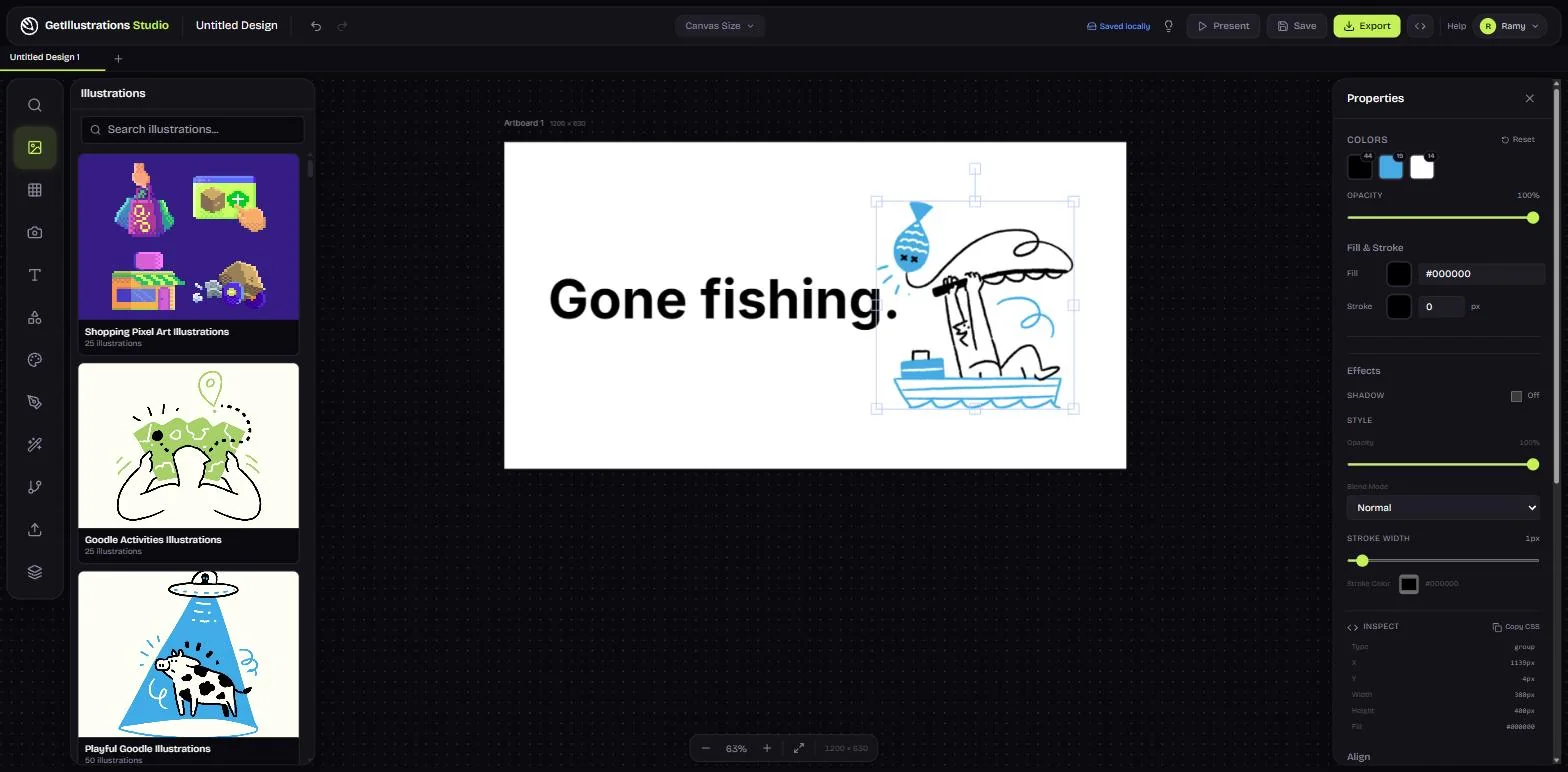 The studio · a Goodle illustration, one heading, three colours to change
1200 × 630 · Facebook post
The studio · a Goodle illustration, one heading, three colours to change
1200 × 630 · Facebook post
- 200,000+ icons Lucide, HeroIcons and ours
- 1,600+ Google Fonts every weight, loaded as you pick
- 4,053 AI stock photos plus the illustration library
- PNG, SVG, PDF up to 4x, no install
One canvas, the library on the left, the export on the right
Real, licensed assets made by illustrators sit a click away from the canvas: every illustration stays an editable SVG, every icon takes your colour, and the type engine reads the whole Google Fonts catalogue. Nothing to install, nothing to import first.
-
The illustration library, on the canvas
Browse 459 packs from the sidebar, filter by style or category, and drop an illustration straight onto the artboard. It arrives as vector, so it scales and recolours without a trip to another tool.
- 200,000+ icons
Lucide, HeroIcons and our native packs. Pick one, set its colour and size, place it in two clicks.
- AI stock photos
4,053 curated pictures from Photogen. Search, preview and drop them on the canvas; free ones carry no watermark.
- Text and typography
1,600+ Google Fonts with every weight, size, colour, spacing, alignment, outline and background.
- Shapes and flowcharts
Rectangles, circles, arrows, stars, callouts and connectors that snap together into diagrams and wireframes.
-
SVG colour editing
Select an illustration and its colours line up in the properties panel; change one and every shape that uses it follows. The eyedropper samples anything on the canvas, and Reset brings the original back.
- Templates and presets
Instagram post and story, Facebook post, YouTube thumbnail, presentation, OG image, logo, business card, or any size you type.
- Export anywhere
PNG up to 4x, SVG for vector work, PDF for print, or copy to the clipboard and paste it where it goes.
- Collaboration
Share a workspace and edit the same canvas together, with live cursors and selection sync.
- Your own files
Upload logos, photos and SVGs of your own; they export without a watermark on every tier.
Four steps, no learning curve
- 1Pick a canvasA preset size for the post, story, slide or card you are making, a template, or a blank artboard of your own size.
- 2Add contentIllustrations, icons and photos from the sidebar; text in any font; shapes and arrows where you need them.
- 3Style itRecolour the artwork, set weights and spacing, align and layer, snap to the grid until it reads right.
- 4Export and usePNG, SVG or PDF straight from the page, or a share link so the team can pick it up.
Open the studio → Free to start. No install, no watermark on your own files.
Free is generous. Premium is everything.
You can do a lot without paying. Premium removes the limits and opens the whole illustration library.
| What you get | Free | Premium |
|---|---|---|
| Canvas editor and every tool | ||
| Icons: Lucide and HeroIcons | Full library | Full library |
| AI stock photos | Browse and preview | Full resolution |
| Google Fonts | 1,600+ fonts | 1,600+ fonts |
| Shapes and flowchart tools | ||
| Export PNG, SVG, PDF | 1x | Up to 4x |
| Free illustration packs | Free packs | All 459 packs |
| Premium illustrations | Full access | |
| Native icon packs | 193K+ icons | |
| Watermark-free exports | Own uploads | Everything |
| Team collaboration | ||
| Priority support |
What people make in it
Social posts and stories
Preset sizes for Instagram, Facebook and YouTube, an illustration that matches the brand, a headline in the right font.
Slides and decks
One visual language across forty slides: the same pack, the same palette, exported as PNG or PDF.
OG and blog images
A 1200 by 630 card with an illustration and a title, in a minute, for every post and every share.
Docs and one-pagers
Icons, a diagram and a couple of illustrations on an A4 canvas, then PDF for print or PNG for the wiki.
Diagrams and wireframes
Shapes, arrows and connectors that snap together; icons from the library where words fall short.
Business cards, flyers and posters exported as PDF with the artwork still vector.
The whole library inside the studio
41K+ illustrations and 193K+ icons across 459 packs, unlimited projects, 4x exports, collaboration, and every new pack as it launches.
See the plans → Browse the library
One-time payment · instant access · 14-day money-back guarantee
- 459illustration packs
- 41K+illustrations
- 193K+icons
- 1,600+Google Fonts
Questions about the Design Studio
Is the Design Studio free?
Yes. The editor, every tool, the icon libraries, the Google Fonts and the free illustration packs cost nothing and need no account. Premium adds the full illustration library, native icon packs, 4x exports and team collaboration.
Which fonts can I use?
1,600+ Google Fonts, loaded as you pick them, with every weight the family has. Search by name or browse by sans-serif, serif, display, handwriting and monospace.
Can I edit the colours of an illustration on the canvas?
Yes. Select any SVG illustration and its colours appear in the properties panel; click one and every shape that uses it changes. The eyedropper samples a colour from anywhere on the canvas.
What can I export?
PNG at 1x on the free tier and up to 4x on Premium, SVG for anything that must stay vector, and PDF for print. Your own uploads export without a watermark on every tier.
Do I need to install anything?
No. The studio runs in Chrome, Firefox, Safari and Edge. Designs save to your account so you can pick them up on another machine.
Open the studio, it's free → Every question, with shortcuts and troubleshooting