Use GetIllustrations where you work
Search, browse, and drag 169K+ hand-crafted illustrations and icons into your favorite design tools, code editors, and AI assistants. No browser tabs. No file downloads. Just drag and drop.
 Figma
PsPhotoshop & Illustrator
FFramer
WfWebflow
VSVS Code
AIMCP
LLucidchart & Lucidspark
Figma
PsPhotoshop & Illustrator
FFramer
WfWebflow
VSVS Code
AIMCP
LLucidchart & Lucidspark
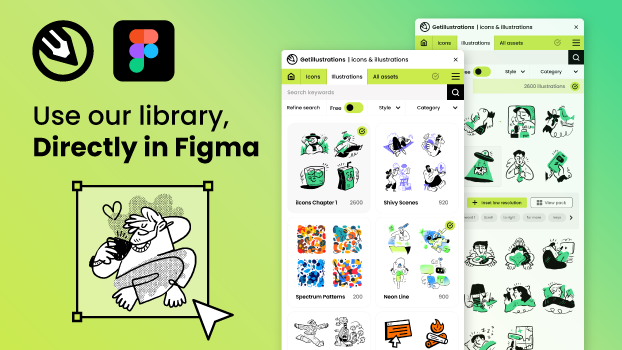
Figma Plugin
Available nowSearch and drag 169K+ illustrations and icons directly onto your Figma canvas. Browse packs, edit colors, and access purchased content.
- Drag & drop
- Color editor
- Pack browsing
Design Tools
Drag illustrations and icons directly onto your canvas
Adobe Plugin Coming soon
Photoshop & IllustratorFramer Plugin Coming soon
For Framer sitesWebflow App Available now
For Webflow sitesDeveloper Tools
Insert icons into your code and AI workflows without leaving your editor
VS Code Extension Coming soon
Visual Studio CodeMCP for AI Assistants Available now
Claude, Cursor & moreDesign Studio Web tool
In your browserCollaboration
Add visual clarity to documents, diagrams, and whiteboards
Lucid Integration Coming soon
Lucidchart & LucidsparkWhat each plugin supports
Hosts differ in how assets land in your file. This is what each one does today.
| Tool | Status | Inserts as | Color | Size | Code snippets | Premium content |
|---|---|---|---|---|---|---|
| Figma | Available now | Drag & drop SVG onto the canvas | ✓ color editor | — | — | Sign in for purchased packs & subscription |
| Webflow | Available now | Inline SVG HTML embed | ✓ | ✓ slider | ✓ | Sign in for premium |
| MCP | Available now | SVG code returned to your AI assistant | — | — | ✓ SVG code | Subscription required for premium |
| Adobe | Coming soon | Smart object (Photoshop) / vector (Illustrator) | ✓ picker + hex | ✓ 16–128px | ✓ 5 formats | Sign in with your account |
| Framer | Coming soon | Click to insert: SVG icons, image illustrations | — | — | — | Illustrations tab with premium content |
| VS Code | Coming soon | Inline SVG, React JSX, Vue, img tag or CSS at the cursor | ✓ | ✓ 16–128px | ✓ 5 formats | API key for premium |
| Lucid | Coming soon | Click to place in documents and boards (64px, resize after) | — | — | — | No account needed for free icons |
— means the feature is not part of that plugin's listed capabilities. Each tool's own page lists its full feature set.
How It Works
Three steps from your tool's marketplace to finished artwork in your file.
Install the plugin
Grab it from your tool's marketplace or the buttons on this page. Every plugin is free to install, no credit card, no trial timer.
Sign in (or don't)
Browse and use free icons without an account. Sign in with Google or email to unlock your purchased packs, subscription content, and favorites.
Drag & drop
Search the whole library from one panel and drop illustrations or icons straight onto your canvas, into your code, or onto your board.
Built for speed
Every plugin shares the same powerful features. Designed to keep you in flow.
Instant search
Type a keyword and results appear as you type. No loading screens, no page reloads. Search spans all icon libraries and 456 illustration packs at once.
Drag and drop
Figma, Adobe, Framer, Webflow and Lucid support drag and drop onto the canvas or board; VS Code and MCP insert icons as code. Grab any icon or illustration from the search results and drop it where you work.
Color customization
Pick from preset swatches or enter a custom hex color. The color gets applied to the SVG before you insert it, so there is no post-editing needed.
Code snippets
Get any icon as raw SVG, React JSX, Vue template, img tag, or CSS background. One click to copy formatted code to your clipboard.
Size control
Slide to set icon size from 16px to 128px. The width and height attributes update in the SVG before insertion so your icon lands at the right scale.
Dark mode + favorites
Toggle dark theme to match your workspace. Save your most-used icons to favorites and access recently used icons without searching again.
Your entire asset library, inside every plugin
Every plugin gives you access to all icons, illustrations, and design assets. Free and premium, all searchable from one panel.
40K+ premium illustrations
456 illustration packs across 50+ styles. Hand-crafted SVG and PNG. Available with pack purchase, bundle, or subscription.
Frequently asked questions
Everything you need to know about installing and using our plugins.
Are the plugins free?
Yes, all plugins are completely free to install and use. You can browse and insert 83K+ free icons without any account or subscription. Premium illustration packs require a purchase, bundle, or active subscription to download.
Do I need an account?
No account is needed to browse and use free icons. To access your purchased packs, subscription content, or saved favorites, sign in with your GetIllustrations account using Google or email login.
Can I drag and drop into my designs?
Yes, every plugin supports drag and drop. In Figma, Adobe, Framer, Webflow, and Lucid, you can grab any icon or illustration from the search results and drop it directly onto your canvas. In VS Code and MCP, icons are inserted as code.
Can I use icons in commercial projects?
Yes. The free icon libraries can be used in personal and commercial projects with a visible credit to GetIllustrations. Premium icons and illustrations include our commercial license with your purchase or subscription.
Do plugins update automatically?
Figma plugins update automatically. VS Code extensions can be set to auto-update in your settings. Adobe plugins update through Creative Cloud. New icons and features are added regularly.
Which formats do plugins output?
All plugins output SVG by default. Depending on the plugin, you can also get PNG, React JSX, Vue template code, CSS background, img tags, and direct canvas placement. The format options vary by tool.
Start using GetIllustrations in your tools
Free to install. 83K+ free icons included. No credit card needed.